![Damotech.png]](https://www.damotech.com/hs-fs/hubfs/Logos/Damotech.png?height=38&name=Damotech.png)
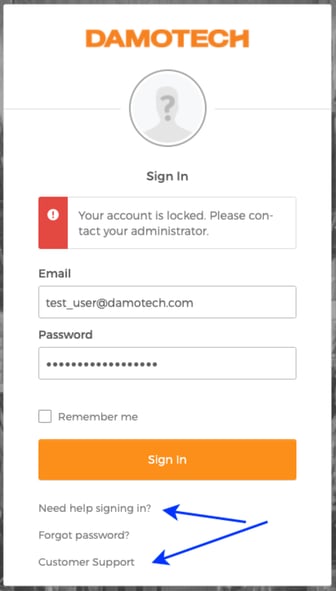
If your account has been locked, it usually means the system has detected multiple unsuccessful login attempts or inactivity over an extended period. These measures help protect your data and maintain the security of your Damotech Platform environment. Submitting a support request is the fastest and most reliable way to regain access, as each authorization must be handled securely by a member of our customer service team.
Once your account is reactivated, you will receive a new activation email with instructions on how to reset your password and verify your identity. Please check your spam or junk folder, as corporate filters may sometimes redirect automated messages. After completing the steps, you will be able to log into the Damotech Platform again and resume managing your rack safety data.
If you use the Damotech Platform to view inspection results, track deficiencies, access engineering reports, or conduct your own routine inspections, regaining access promptly is essential. The Platform centralizes all your rack-related information—photos, priority levels, load capacity data, dashboards, and plan views—ensuring uninterrupted visibility over your warehouse safety program.
Should you experience recurring login issues, consider verifying that your username is correct, checking that your browser is up to date, or testing access from another device. If your organization manages several warehouses, your administrator may also confirm that your permission is active.
For additional help or to request platform training, please contact our support team directly. We’re here to ensure seamless access, so you can continue to track and improve rack safety across your facilities.