![Damotech.png]](https://www.damotech.com/hs-fs/hubfs/Logos/Damotech.png?height=38&name=Damotech.png)
Disabled account or expired activation link.
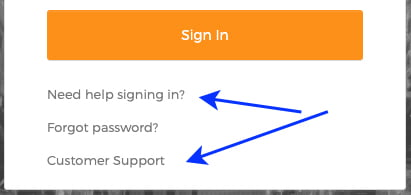
- Click on 'Need help signing in?' and then on 'Customer Support'.
- You will be redirected to the Customer Support website.
- You will be able to create a Technical Support request.
- A member of the Customer Service team will reactivate your account.
- You will receive an account activation email. Just follow the steps.
- See the Support request and Access to Damotech: Login section 'New user - first access' articles for more information.
|
Once your account has been reactivated and your password reset, you can log back in and continue to manage and maintain your pallet racks, ensuring the safety of your employees.
The Damotech Platform is available online through your web browser or via our mobile app, which can be downloaded from the Apple App Store or Google Play Store. It is offered as a SaaS (Software-as-a-Service) solution, and everything, from the application to your data, is securely hosted in the cloud. That means you’re always using the latest and greatest version of the software.
The Damotech Platform is available online and can be accessed through your web browser, regardless of your location. If you have internet access, any computer with the latest version of your preferred browser will provide you with access to the Damotech Platform. As for the mobile apps, any modern tablet or iPhone running the latest version of the OS will do.
With access to the latest rack inspection data, warehouse operators can better manage the maintenance of racking assets with less effort. Accessible through the cloud, our desktop platform and mobile app make it easier than ever to track your progress toward a safer warehouse. All data is stored on our cloud-based inspection software, accessible to everyone.